
Fog, haze, CO₂, cold-spark and other stage effects can transform a lighting look into a memorable show moment. The control workflow, however, is often less simple than the effect itself. A basic remote may only operate one machine. A full lighting console provides detailed control but can be unnecessarily complex for a venue employee, DJ assistant or event operator who only needs a few approved cues.
A physical DMX button controller offers a practical middle ground. A technician prepares and tests the required DMX values on a console or software system, records those values into the controller, and then assigns them to clearly labeled buttons. During the event, the operator recalls a known cue without navigating fixture pages, channel faders or network settings.
The Pknight CM003 was designed around this record-and-recall workflow. Its primary role is scene recording and standalone playback, but the same workflow is useful for DMX-enabled show devices when every cue has been planned, tested and approved in advance.
Why Stage-Effect Control Becomes Complicated
Many DMX effect machines expose more than a simple on/off function. Depending on the model, a DMX personality may include output level, fan speed, duration mode, color, heating or enable channels. The exact mapping varies from one manufacturer and model to another.
That flexibility is useful during programming, but it creates friction during routine operation. The person pressing “fog” at a wedding or calling an effect during a product launch should not need to remember which value belongs on which channel. They need a clearly defined action that produces the same result every time.
This is the key distinction:
- The console or software is used to build and test the effect cue.
- The CM003 is used to record and recall the approved DMX state.
- The operator uses a physical button to execute the correct cue at the correct moment.
How the CM003 Stage-Effect Workflow Works
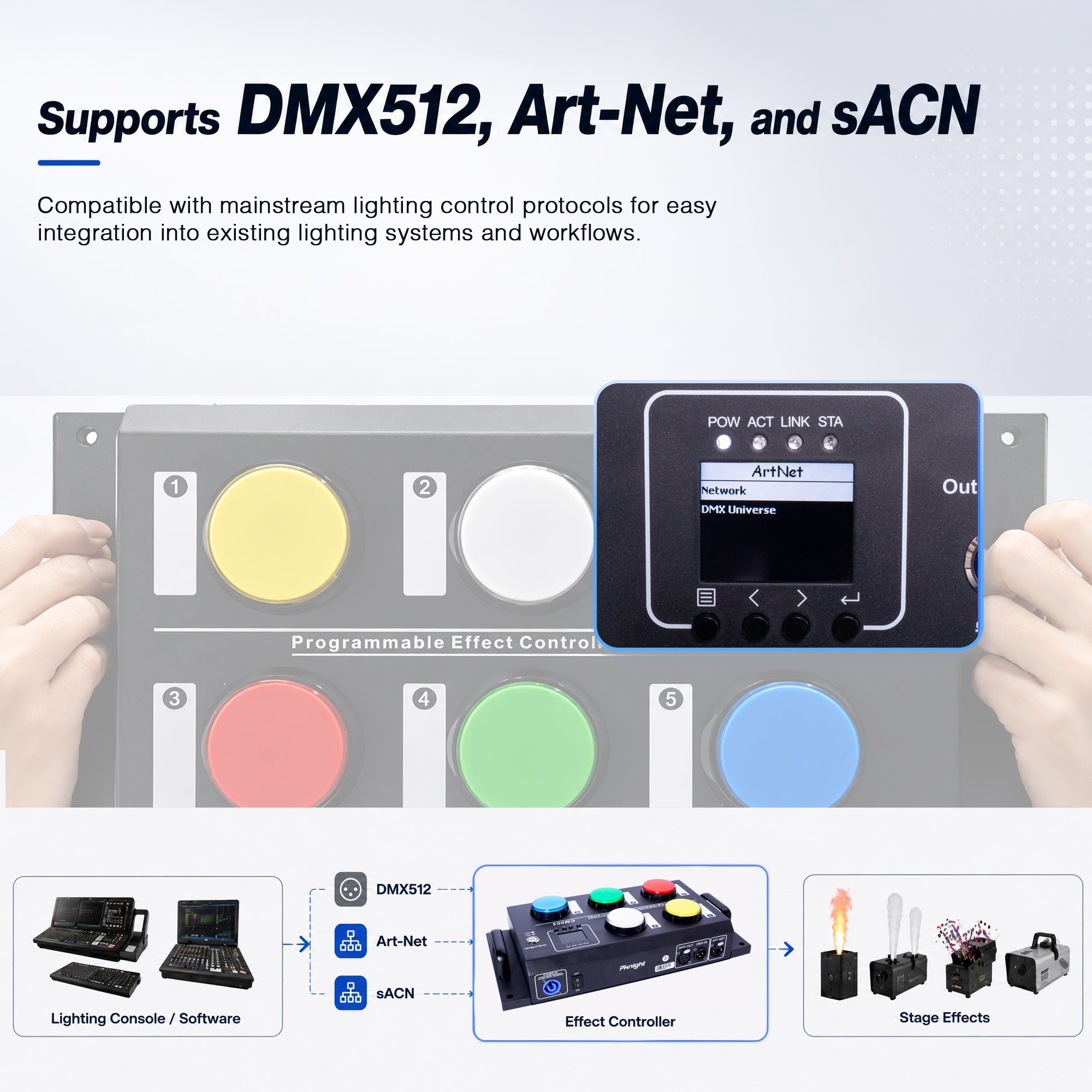
The workflow has two stages. During setup, connect the console or software to the CM003 through DMX512, Art-Net or sACN. Prepare the approved effect output, select a CM003 button, define the channel range, and record the DMX state.
During the event, the CM003 can play back the recorded values without requiring the operator to navigate the original console or software. This reduces the number of decisions that must be made live while preserving the programming work completed by the technician.

The rear panel provides DMX input, DMX output and an Art-Net connection, allowing the recording workflow to fit traditional DMX lines as well as network-based setups. Protocol support does not remove the need for correct addressing: the effect machine, the programming source and the CM003 must still use the intended universe and channel range.

Start with the Effect Machine's DMX Chart
Before recording anything, read the effect manufacturer's current manual. Identify:
- the DMX start address;
- the number of channels used by the selected personality;
- the value range that activates the required output;
- the value required to stop, release or reset the effect;
- any enable, safety or arming channel defined by the manufacturer.
Do not assume that two fog machines use the same channel map. One unit may use a single channel for output, while another may separate pump, fan and enable functions. The CM003 records the DMX values it receives; it does not reinterpret an incorrect fixture profile or repair an incorrect address plan.
Define the Channel Range on the CM003
For each button, the CM003 provides three useful range settings:
- StartAddr: the first DMX address in the controlled range;
- Channels: the number of channels used by each device;
- Devices: the number of identical devices in the group.
These settings tell the controller which section of the DMX universe belongs to that button. Keep the complete range within the 512 channels of the universe and document the assignment for future maintenance.

Use Press and Release as Two Deliberate States
Each of the five CM003 buttons can store an On Press action and an On Release action. This allows up to ten recorded actions from five physical buttons.
For a momentary fog cue, the technician might record an approved output state for On Press and the manufacturer-specified stop or reset state for On Release. For a combined show cue, pressing a button might recall a lighting look together with an atmospheric effect, while releasing it returns the assigned range to its planned follow-up state.
The important point is that the release state must be programmed intentionally. Never guess that “zero” is correct for every device; use the exact channel chart and operating procedure for that model.

Hold Mode
In Hold mode, the assigned function remains active while the button is held and stops or changes when the button is released. It is often the clearest interaction for a supervised, momentary effect cue because the operator's physical action remains connected to the cue.
Toggle Mode
Toggle mode changes state when the button is pressed and keeps that state until the next operation. It can be appropriate for persistent, non-hazardous scenes such as a steady haze level or a venue lighting look, provided the connected device supports that workflow.
Toggle should not be treated as permission to leave a hazardous effect running unattended. Device-specific restrictions, supervision and safety systems always take priority.
Off
Off disables an unused button. If an event needs only three effect cues, disabling the other two buttons can reduce accidental operation and make staff training simpler.
Control Several Identical Fog Machines as a Group
The CM003 manual uses a useful example: five fog machines, each using two DMX channels, beginning at address 001. The settings are:
- StartAddr: 001
- Channels: 2
- Devices: 5
That produces five consecutive two-channel blocks from 001 through 010. A technician can build a coordinated state for the complete group and record it to one button.

This approach works best when the machines are identical and use the same DMX personality. If the units use different channel maps, treat them as separate planned ranges rather than assuming that the same values will have the same meaning.
How to Record an Effect Cue
Use the following high-level workflow after the connected effect system has been installed and approved:
- Connect the programming console or software to the CM003 using DMX512, Art-Net or sACN.
- Confirm the effect machine's address, personality and manufacturer-required operating state.
- Prepare and test the intended DMX output with the appropriate qualified operator.
- Open Button Set on the CM003 and choose one of the five buttons.
- Enter StartAddr, Channels and Devices for the planned range.
- Open On Press or On Release, select Scene Record, and record the current DMX values.
- Hold Enter for approximately two seconds to save.
- Test the button, the release behavior, power cycling and the intended safe shutdown before the event.

Do not record a hazardous effect simply because the DMX values appear to work. The complete device procedure—including arming, supervision, clearance and emergency response—must also be validated.
Five Practical Button Ideas
The five buttons should be labeled by purpose rather than by number. A typical event might use:
- Fog Burst: a short, supervised atmospheric cue with a programmed release state.
- Light Haze: a tested, appropriate output for maintaining beam visibility.
- Lighting + Atmosphere: a coordinated look for an entrance, reveal or music transition.
- Feature Cue: an authorized effect moment for a trained operator, using all manufacturer-required safety systems.
- Return / Stop State: a clearly identified cue that returns the assigned DMX range to its planned inactive state.
These are workflow examples, not universal DMX values. Each connected machine must be programmed from its own manual.
Where Physical Effect Buttons Are Useful
DJs and Mobile Events
A technician can prepare the effect states before the event, while the DJ or an assistant recalls a limited set of labeled cues during the show.
Weddings and Event Venues
Buttons can represent repeatable moments such as an entrance, first dance, room reveal or party transition. Staff do not need access to every programming parameter.
Clubs and Small Stages
Frequently used atmospheric looks can be standardized across different operators and repeated performances.
Exhibitions and Product Launches
A physical cue can coordinate lighting and an approved atmospheric effect during a reveal without forcing the presenter to navigate control software.
Haunted Attractions and Immersive Spaces
Preprogrammed environmental cues can be recalled consistently, provided every effect is suitable for the venue, supervised as required and covered by the site's safety plan.
Important Safety Boundary for Flame and Hazardous Effects
The CM003 recalls recorded DMX values. It is not a safety controller, firing authorization system or replacement for the safeguards built into flame, pyrotechnic, CO₂, cold-spark or other hazardous equipment.

Always retain and follow:
- the effect manufacturer's safety channels, interlocks and arming procedure;
- a functioning emergency stop and verified safe shutdown method;
- direct supervision by a trained and authorized operator;
- required permits, risk assessment and local regulations;
- specified clearances, exclusion zones, ventilation and fire precautions;
- a final site test with the complete installed system.
A simple button is valuable because it reduces interface complexity. It must never reduce the safety controls around the effect itself.
A Better Way to Hand Off Preprogrammed Effects
The strongest use case for the Pknight CM003 is not replacing the technician who understands the effect system. It is preserving that technician's programming and presenting the approved results through a simple physical interface.
Five buttons, separate press and release actions, configurable device ranges, and standalone playback can turn a complicated DMX setup into a controlled set of repeatable cues. That makes the CM003 useful wherever a show must be programmed professionally but operated consistently by a smaller event team.
For a deeper explanation of recording scenes and playing them without a console, read How to Record and Play Back DMX Scenes Without a Lighting Console.
View the Pknight CM003 product details.
Frequently Asked Questions
Can the CM003 control a DMX fog machine?
It can record and recall DMX values for a correctly addressed DMX fog machine. The channel count, activation values and stop state must come from that machine's current DMX chart.
Can one button control several fog machines?
Yes, a planned channel range can include several devices. Grouping is simplest when the machines are identical and use the same DMX personality.
What is the difference between Hold and Toggle for effects?
Hold remains active while the button is held, making it intuitive for suitable momentary cues. Toggle keeps a state active after a press and is better reserved for appropriate persistent, non-hazardous scenes.
Can the CM003 replace the original controller or computer?
After approved cues are recorded, the CM003 can provide standalone playback for those stored states. The original console or software is still valuable for programming, editing and troubleshooting.
Can the CM003 replace the safety system on a flame or pyrotechnic machine?
No. It only recalls DMX cue data. Manufacturer interlocks, safety channels, arming procedures, emergency stops, qualified supervision and local safety requirements must remain in place.